EMSHIबीटा

भाषा

भाषा

EMSHI का उपयोग कैसे करें

Practical guides for the main EMSHI journeys — getting a vehicle moved, getting a personal Driver sticker, running your organization, responding to an alert, printing stickers, privacy, and what happens if nobody replies.

गाइड

  1. यदि आप अटके हैं

    कोई ऐप या खाता नहीं। फ़ोन कैमरे से वाहन स्टिकर स्कैन करें — व्यस्त पार्किंग, विज़िटर बे और इवेंट में।

    1. विंडस्क्रीन स्टिकर का QR कैमरा या ब्राउज़र से स्कैन करें।
    2. स्क्रीन पर नंबर प्लेट सामने वाले वाहन से मिलाएँ।
    3. Notify दबाएँ — ज़िम्मेदार संपर्क निजी तौर पर अलर्ट होता है; वे आपका नंबर नहीं देखते।
    4. Stay on the request status page for updates (notified, on the way, moved). You can cancel the request from that page before the contact responds.
    5. कोई जवाब न हो और साइट दे तो Escalate से साइट संपर्क जुड़ सकता है।
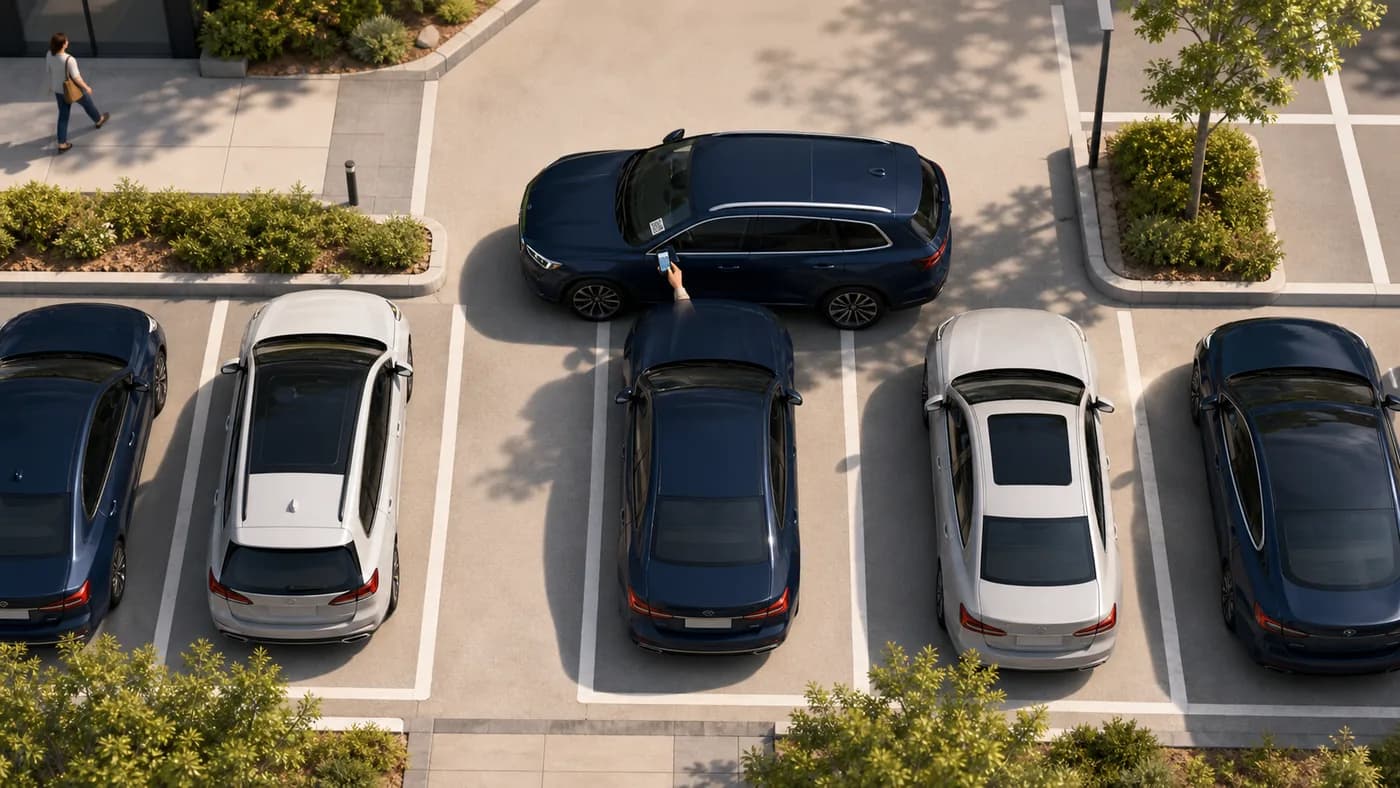
    ऊपर से दृश्य: अटकी कार जबकि अनुरोधकर्ता ब्लॉकिंग वाहन का QR स्कैन करता है
    अटका हुआउस वाहन के स्टिकर को स्कैन करें जो आपको बाहर निकलने से रोक रहा है।

    सुझाव: स्थिति पेज खुला रखें। खुद कॉल या मैसेज की ज़रूरत नहीं।

  2. If you want a personal Driver sticker

    A personal printable QR for your own car. No traditional account. When you block someone in, they can ask you to move — privately.

    1. Go to For Drivers and enter your mobile, registration, make, model, and colour.
    2. Confirm your mobile with the one-time code we text you, then get your QR (personal Driver stickers are free during launch).
    3. Print the sticker and place it inside your windscreen where scanners can see it.
    4. When someone scans it, you get an SMS with a secure link — reply On my way, I have moved it, or I can't move it.
    5. If you lose the sticker, recover and reprint from For Drivers → Recover using the same mobile number.

    Tip: Driver stickers send one automatic reminder and do not escalate to a site contact.

  3. यदि आप संगठन चलाते हैं

    डैशबोर्ड पर लोग व वाहन जोड़ें, ज़िम्मेदारी दें, फिर बेड़े के स्टिकर प्रिंट करें।

    1. साइन इन करें, माँगे जाने पर प्लान चुनें, संगठन प्रोफ़ाइल पूरा करें।
    2. Add contacts with a working mobile number in international format. Each contact must open the SMS agree link and tap I agree before they can receive movement alerts.
    3. वाहन जोड़ें और प्रत्येक को संपर्क/ग्रुप दें — बिना असाइनमेंट प्रिंट नहीं।
    4. Vehicles में QR बनाएँ और कट गाइड वाला A4 शीट प्रिंट करें।
    5. स्टिकर अंदर विंडस्क्रीन पर लगाएँ; बड़ी सूची के लिए Import/Export।

    Tip: Watch Dashboard readiness and Needs attention so missing contacts, pending agreements, or QR gaps are fixed before drivers get stuck.

  4. यदि मूव अनुरोध मिले

    जब कोई वाहन हटाना चाहे तो SMS आता है। आपका नंबर अनुरोधकर्ता से छुपा रहता है।

    1. SMS का सुरक्षित लिंक खोलें (ऐप नहीं)।
    2. Choose On my way, I have moved it, or I can't move it. If someone else in your group already claimed it, you may see Covered — no action needed.
    3. अनुरोधकर्ता नाम/नंबर के बिना स्थिति देखता है।
    4. रिमाइंडर पर वही लिंक खोलकर स्थिति अपडेट करें।
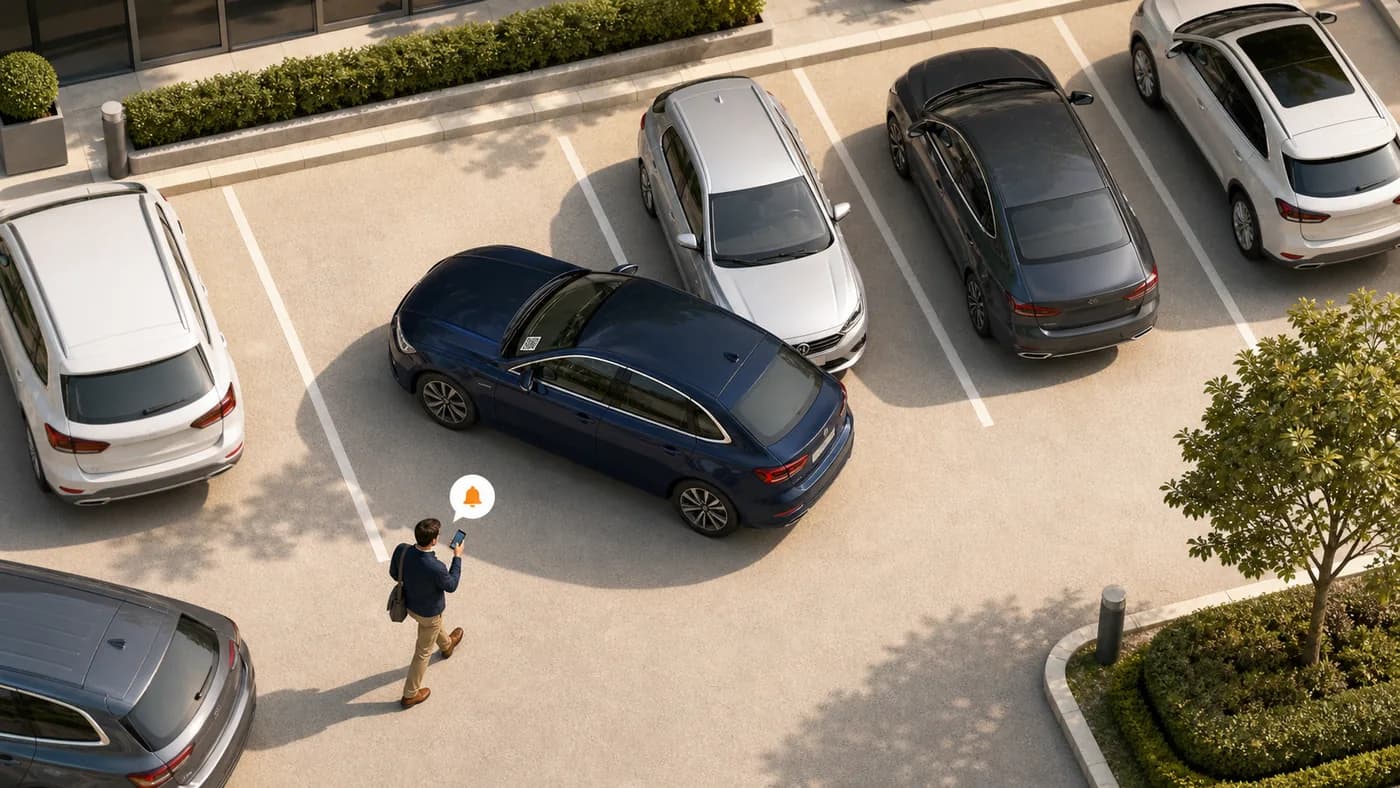
    ऊपर से दृश्य: ब्लॉकर को अलर्ट मिल रहा है जबकि एक कार दूसरे को रोक रही है
    ब्लॉकरअलर्ट खोलें और ज़रूरत पड़ने पर वाहन हटाएँ।

    सुझाव: जल्दी करें; खुला रहे तो रिमाइंडर और एस्केलेशन हो सकते हैं।

  5. स्टिकर प्रिंट और लगाना

    A4 शीट, कट गाइड और स्पष्ट QR विंडस्क्रीन स्कैन के लिए।

    1. Print from Dashboard (organizations) or For Drivers (personal stickers) using a normal printer and A4 paper or sticker sheets.
    2. धराशायी रेखाओं पर काटें।
    3. स्टिकर अंदर लगाएँ जहाँ स्कैनर देखे — गहरा टिंट/कबाड़ से बचें।
    4. QR दोबारा बनाएँ तो तुरंत नया प्रिंट; पुराने कोड बंद।

    सुझाव: कुछ अतिरिक्त स्टिकर रखें।

  6. गोपनीयता कैसे काम करती है

    EMSHI इस तरह बना है कि अनुरोधकर्ता और संपर्क निजी नंबर न बाँटें।

    1. बिना खाते स्कैन-नोटिफ़ाई; नंबर साझा नहीं।
    2. EMSHI संपर्क को संदेश भेजता है; अनुरोधकर्ता नाम/नंबर नहीं देखता।
    3. स्थिति अनुरोध पेज पर रहती है।
    4. एस्केलेशन पर सीमित विवरण संगठन एस्केलेशन संपर्क तक — सार्वजनिक नहीं।

    सुझाव: गोपनीयता नीति पढ़ें।

  7. यदि कोई जवाब न दे

    Most requests resolve after the first SMS. When a site configures escalation, requesters get a further option. Personal Driver stickers do not escalate.

    1. नोटिफ़ाई के बाद स्थिति पेज पर रहें।
    2. अल्पकाल बाद बिना स्वीकृति रिमाइंडर स्वतः जा सकता है।
    3. संगठन ने चालू किया हो तो Escalate साइट फ़ोन को (सामान्य जिम्मेदार से अलग)।
    4. एस्केलेशन तुरंत हटाने की गारंटी नहीं — जब सामान्य व्यक्ति अनुपलब्ध हो तो मदद माँगता है।

    सुझाव: Settings में एस्केलेशन चालू करें; वैध मोबाइल और शेड्यूल रखें।

अक्सर पूछे जाने वाले प्रश्न

ड्राइवर और व्यवस्थापक के लिए त्वरित उत्तर।

क्या वाहन हटवाने के लिए ऐप चाहिए?
नहीं। QR स्कैन करें, प्लेट जाँचें, ब्राउज़र में Notify दबाएँ।
क्या कोई मेरा या ड्राइवर का नंबर देखेगा?
नहीं। EMSHI ज़िम्मेदार को सूचित करता है। सामान्य प्रवाह में नाम-नंबर निजी रहते हैं।
कोई जवाब न मिले तो?
Stay on the status page. You may get an Escalate option if your organization has set that up. Escalation alerts a site contact; it does not force the vehicle to move. Personal Driver stickers send one reminder and do not escalate.
EMSHI किसके लिए?
Anyone who wants a private nudge when they block someone in (personal Driver stickers), and shared parking sites — offices, business parks, universities, residential estates, busy car parks, and event or venue parking — that want blocked-in drivers helped without swapping personal numbers.
एडमिन क्या सेट करें?
Add contacts and vehicles, assign who is responsible for each vehicle, wait for each contact to agree on the SMS link, generate and print QR stickers, then place them on windscreens. Import/export helps with larger fleets.
QR स्टिकर खो/टूटा?
An administrator regenerates the code from Vehicles and prints a new sticker. The old code stops working so only the new sticker remains valid. Driver sticker owners can recover and reprint from अपना EMSHI ड्राइवर QR कोड पुनर्प्राप्त करें using the mobile number used when you got the sticker.
बिना संपर्क प्रिंट?
No. Every printable organization vehicle needs a responsible contact or group first, so a scan can deliver a real SMS. Personal Driver stickers use your own mobile as the contact.
बिलिंग कैसे?
Organization plans are flat USD rates by vehicle count (monthly or annual). See Pricing for current amounts and Terms for the detailed month-of-use billing rule. Personal Driver stickers are free during launch.
योजना कैसे अपग्रेड या डाउनग्रेड करें?
अपग्रेड: डैशबोर्ड → बिलिंग → योजना अपग्रेड (Pricing खुलता है; सदस्यता के दौरान वर्तमान और निचले स्तर लॉक रहते हैं)। निचली योजना के लिए पहले बिलिंग पर सदस्यता रद्द करें, फिर Pricing पर निचली योजना खरीदें। रद्द करने से नवीनीकरण रुकते हैं; वर्तमान अवधि के बिल किए गए राशियाँ वापस नहीं होतीं।
Why must organization contacts tap I agree?
Before a contact receives movement-request SMS, they must open the one-time agree link we text them and tap I agree. That confirms they are happy to get private move alerts. Changing their phone number clears agreement and sends a new link.
EMSHI का उपयोग कैसे करें · EMSHI