EMSHIBeta

语言

语言

如何使用 EMSHI

Practical guides for the main EMSHI journeys — getting a vehicle moved, getting a personal Driver sticker, running your organization, responding to an alert, printing stickers, privacy, and what happens if nobody replies.

指南

  1. 如果你被堵住

    无需应用或账号。用手机摄像头扫车辆贴纸——适用于繁忙停车场、访客车位和活动场地。

    1. 用相机或浏览器扫描前挡风贴纸上的二维码。
    2. 确认屏幕上的车牌与面前车辆一致。
    3. 点「通知」,私下提醒负责人——对方看不到你的号码。
    4. Stay on the request status page for updates (notified, on the way, moved). You can cancel the request from that page before the contact responds.
    5. 若无回复且场地提供,可能出现「升级」以联系场地联系人。
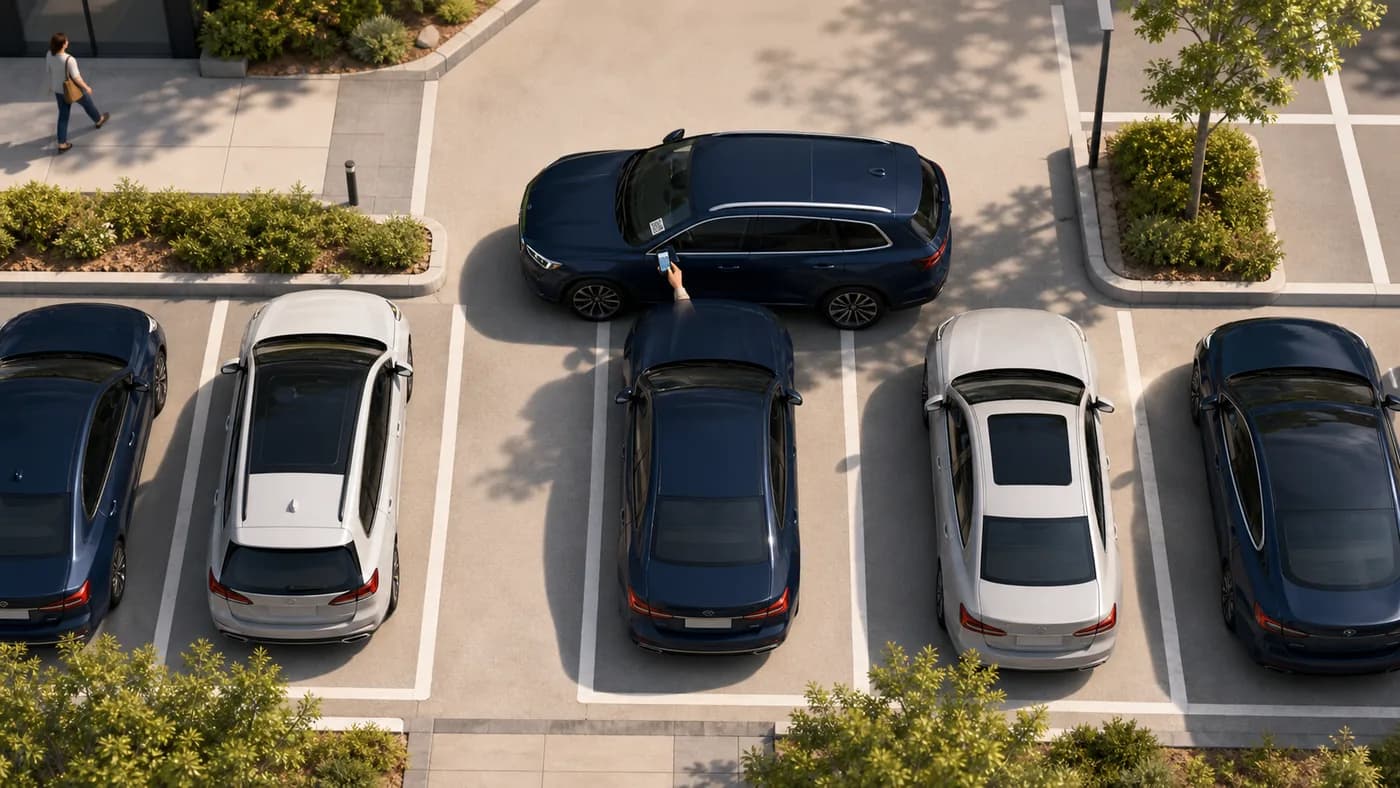
    俯视:被挡住的车,请求者扫描阻挡车辆上的二维码贴纸
    被挡住扫描挡住你驶离的车辆上的贴纸。

    提示:保持状态页打开。你不必亲自打电话或发短信。

  2. If you want a personal Driver sticker

    A personal printable QR for your own car. No traditional account. When you block someone in, they can ask you to move — privately.

    1. Go to For Drivers and enter your mobile, registration, make, model, and colour.
    2. Confirm your mobile with the one-time code we text you, then get your QR (personal Driver stickers are free during launch).
    3. Print the sticker and place it inside your windscreen where scanners can see it.
    4. When someone scans it, you get an SMS with a secure link — reply On my way, I have moved it, or I can't move it.
    5. If you lose the sticker, recover and reprint from For Drivers → Recover using the same mobile number.

    Tip: Driver stickers send one automatic reminder and do not escalate to a site contact.

  3. 如果你管理组织

    在控制台登记人员与车辆、分配责任,然后为车队打印贴纸。

    1. 登录,按提示选择套餐,完成组织资料。
    2. Add contacts with a working mobile number in international format. Each contact must open the SMS agree link and tap I agree before they can receive movement alerts.
    3. 添加车辆并分配联系人或组——未分配的车辆不能打印。
    4. 在「车辆」中生成二维码并打印带裁切线的 A4 贴纸页。
    5. 将贴纸贴在挡风内侧,大批量可用导入/导出。

    Tip: Watch Dashboard readiness and Needs attention so missing contacts, pending agreements, or QR gaps are fixed before drivers get stuck.

  4. 如果你收到挪车请求

    有人需要挪车时你会收到短信。号码对请求方保持私密。

    1. 打开短信中的安全链接(无需应用)。
    2. Choose On my way, I have moved it, or I can't move it. If someone else in your group already claimed it, you may see Covered — no action needed.
    3. 请求方可见状态,但看不到你的姓名与号码。
    4. 若收到提醒,再次打开同一链接更新状态。
    俯视:阻挡者在阻挡车辆旁收到提醒
    阻挡方打开提醒,在有人需要时挪开车辆。

    提示:尽快处理——否则可能提醒与升级。

  5. 打印与张贴贴纸

    A4 图纸、裁切线与清晰的前挡风二维码。

    1. Print from Dashboard (organizations) or For Drivers (personal stickers) using a normal printer and A4 paper or sticker sheets.
    2. 沿虚线裁切以保持完整。
    3. 贴在挡风内侧便于扫描处——避免重色膜与遮挡。
    4. 重新生成二维码后立即打印更换——旧码失效。

    提示:备几张备用贴纸,用于换玻璃或丢失后。

  6. 隐私如何运作

    EMSHI 设计为请求方与负责人互不交换个人号码。

    1. 请求方扫码通知,无需账号,也不向对方分享自己的号码。
    2. 由 EMSHI 通知负责人;请求方看不到姓名与号码。
    3. 状态保留在请求页,无需互相联系。
    4. 升级时可能将有限信息分享给组织的升级联系人——不公开张贴。

    提示:阅读隐私政策了解保留期限与管理员可见内容。

  7. 如果无人回复

    Most requests resolve after the first SMS. When a site configures escalation, requesters get a further option. Personal Driver stickers do not escalate.

    1. 通知后留在状态页,可看到负责人何时被联系。
    2. 若短时间无确认,可能自动发送提醒。
    3. 组织启用后,「升级」会联系车辆常规负责人以外的场地号码。
    4. 升级不保证立刻挪车——在常规人员无响应时请场地协助。

    提示:在设置中开启升级,并保持有效手机号与时间表。

常见问题

给驾驶人与机构管理员的简要解答。

挪车需要应用吗?
不需要。扫描车辆二维码,确认车牌,在手机浏览器点「通知」。
会有人看到我的或司机的号码吗?
不会。EMSHI 通知负责人。正常流程中双方姓名与号码保持私密。
如果无人回复?
Stay on the status page. You may get an Escalate option if your organization has set that up. Escalation alerts a site contact; it does not force the vehicle to move. Personal Driver stickers send one reminder and do not escalate.
EMSHI 面向谁?
Anyone who wants a private nudge when they block someone in (personal Driver stickers), and shared parking sites — offices, business parks, universities, residential estates, busy car parks, and event or venue parking — that want blocked-in drivers helped without swapping personal numbers.
管理员要设置什么?
Add contacts and vehicles, assign who is responsible for each vehicle, wait for each contact to agree on the SMS link, generate and print QR stickers, then place them on windscreens. Import/export helps with larger fleets.
二维码贴纸丢失或损坏?
An administrator regenerates the code from Vehicles and prints a new sticker. The old code stops working so only the new sticker remains valid. Driver sticker owners can recover and reprint from 恢复你的 EMSHI 司机二维码 using the mobile number used when you got the sticker.
没有联系人能否打印?
No. Every printable organization vehicle needs a responsible contact or group first, so a scan can deliver a real SMS. Personal Driver stickers use your own mobile as the contact.
如何计费?
Organization plans are flat USD rates by vehicle count (monthly or annual). See Pricing for current amounts and Terms for the detailed month-of-use billing rule. Personal Driver stickers are free during launch.
如何升级或降级?
升级:仪表盘 → 账单 → 升级方案(打开价格页;订阅期间当前及更低档位保持锁定)。降级请先在账单取消订阅,再在价格页购买更低方案。取消会停止续订;当期已出账金额不予退款。
Why must organization contacts tap I agree?
Before a contact receives movement-request SMS, they must open the one-time agree link we text them and tap I agree. That confirms they are happy to get private move alerts. Changing their phone number clears agreement and sends a new link.
如何使用 EMSHI · EMSHI