EMSHIتجريبي

اللغة

اللغة

كيفية استخدام EMSHI

Practical guides for the main EMSHI journeys — getting a vehicle moved, getting a personal Driver sticker, running your organization, responding to an alert, printing stickers, privacy, and what happens if nobody replies.

الأدلة

  1. إذا كنت محاصراً

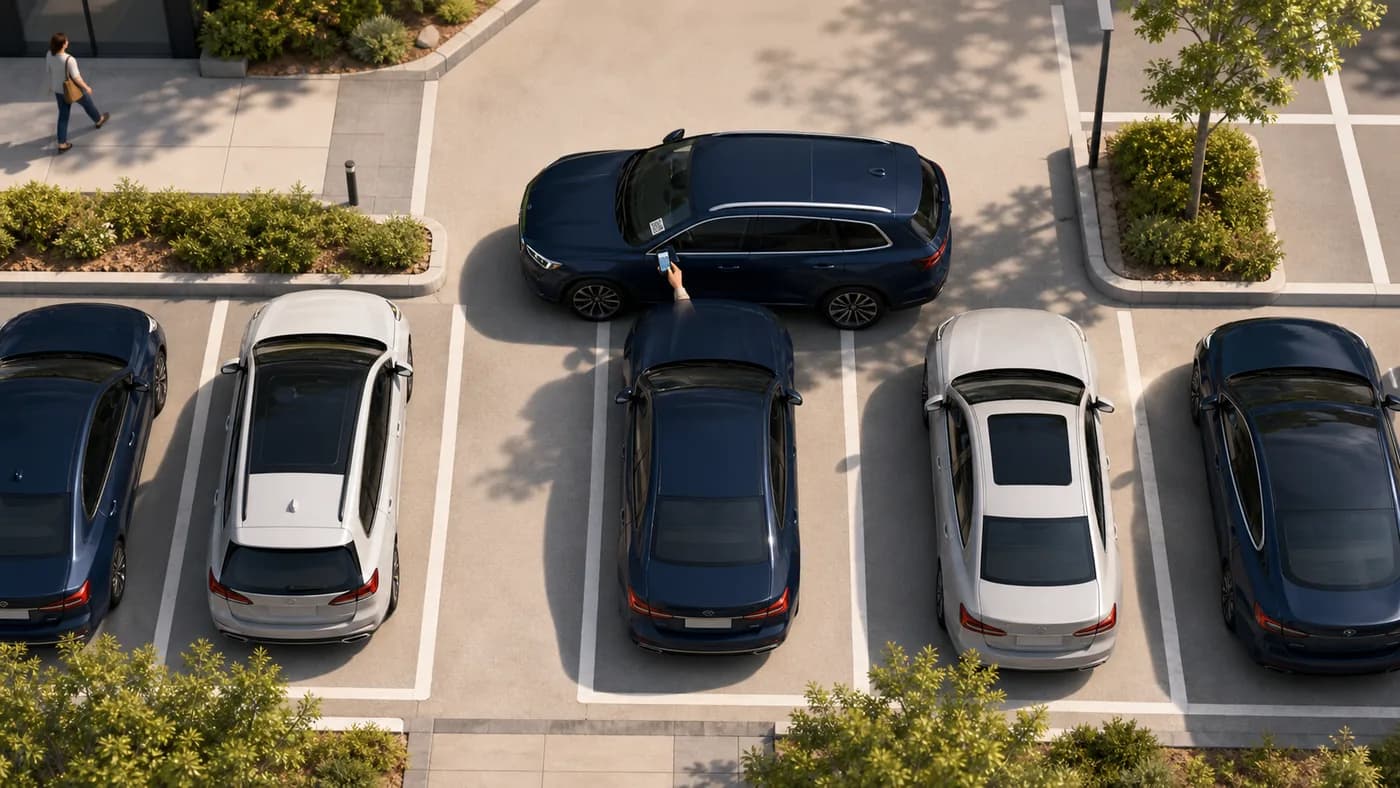
    لا تطبيق ولا حساب. استخدم كاميرا هاتفك على ملصق المركبة — تناسب مواقف السيارات المزدحمة ومواقف الزوار والفعاليات.

    1. امسح رمز QR على ملصق الزجاج الأمامي بكاميرا الهاتف أو المتصفح.
    2. تأكد أن رقم اللوحة الظاهر يطابق المركبة أمامك.
    3. اضغط «إشعار» لتنبيه جهة الاتصال المسؤولة بخصوصية — ولن يروا رقمك.
    4. Stay on the request status page for updates (notified, on the way, moved). You can cancel the request from that page before the contact responds.
    5. إذا لم يرد أحد وتوفّر الموقع ذلك، قد ترى خيار «تصعيد» لإشراك جهة اتصال الموقع.
    منظر علوي لسيارة محاصرة بينما يطلب أحدهم المساعدة بمسح ملصق QR على المركبة الحاجزة
    محاصرامسح الملصق على المركبة التي تمنعك من المغادرة.

    نصيحة: أبقِ صفحة الحالة مفتوحة. لا حاجة للاتصال أو المراسلة بنفسك.

  2. If you want a personal Driver sticker

    A personal printable QR for your own car. No traditional account. When you block someone in, they can ask you to move — privately.

    1. Go to For Drivers and enter your mobile, registration, make, model, and colour.
    2. Confirm your mobile with the one-time code we text you, then get your QR (personal Driver stickers are free during launch).
    3. Print the sticker and place it inside your windscreen where scanners can see it.
    4. When someone scans it, you get an SMS with a secure link — reply On my way, I have moved it, or I can't move it.
    5. If you lose the sticker, recover and reprint from For Drivers → Recover using the same mobile number.

    Tip: Driver stickers send one automatic reminder and do not escalate to a site contact.

  3. إذا كنت تدير المنظمة

    استخدم لوحة التحكم لتسجيل الأشخاص والمركبات وتعيين المسؤولية ثم طباعة ملصقات الأسطول.

    1. سجّل الدخول، واختر خطة إن طُلب منك، وأكمل ملف منظمتك.
    2. Add contacts with a working mobile number in international format. Each contact must open the SMS agree link and tap I agree before they can receive movement alerts.
    3. أضف مركبات وعيّن كلاً منها لجهة اتصال أو مجموعة مسؤولة — لا تُطبع الملصقات للمركبات غير المعيّنة.
    4. من المركبات، أنشئ رموز QR واطبع ورقة ملصقات A4 مع خطوط القص.
    5. ثبّت الملصقات داخل الزجاج الأمامي واستخدم الاستيراد/التصدير عند الحاجة لتحميل سجلات كثيرة.

    Tip: Watch Dashboard readiness and Needs attention so missing contacts, pending agreements, or QR gaps are fixed before drivers get stuck.

  4. إذا وصلتك طلب تحريك

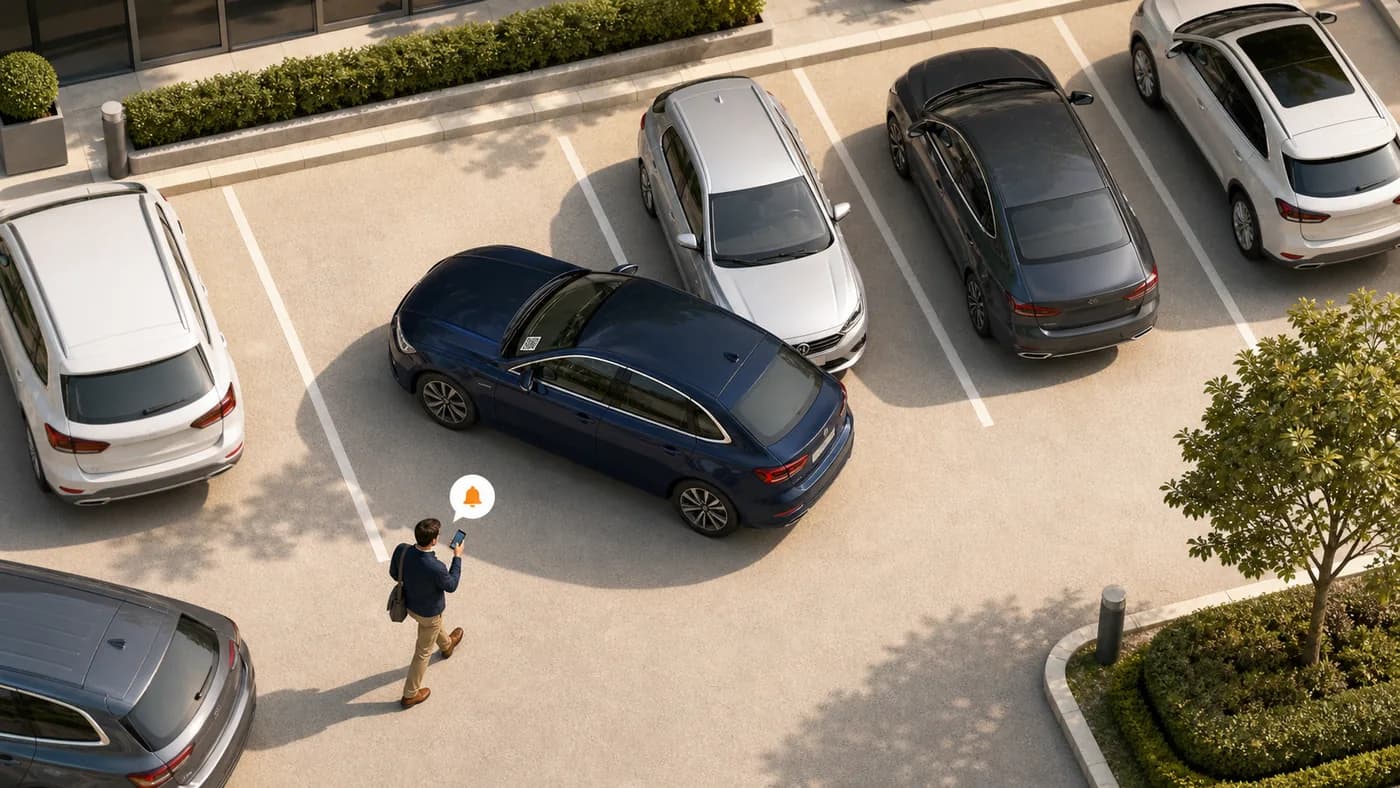
    تصلك رسالة SMS عندما يحتاج أحدهم لتحريك المركبة. يبقى رقمك خاصاً عن الطالب.

    1. افتح الرابط الآمن في الرسالة (لا يلزم تطبيق).
    2. Choose On my way, I have moved it, or I can't move it. If someone else in your group already claimed it, you may see Covered — no action needed.
    3. يرى الطالب تحديثات الحالة دون اسمك أو رقمك.
    4. إذا وصلتك تذكرة لاحقاً، افتح الرابط نفسه مرة أخرى لتحديث الحالة.
    منظر علوي لشخص يتلقى تنبيهاً بجانب سيارة تمنع مركبة أخرى
    الحاجزافتح التنبيه وحرّك المركبة عندما يطلب أحدهم منك التحرك.

    نصيحة: تحرّك بسرعة إن أمكن — قد تليها تذكيرات وتصعيد إن بقي الطلب مفتوحاً.

  5. طباعة الملصقات وعرضها

    الملصقات مصمّمة لأوراق A4 مع خطوط قص ورمز QR واضح لمسح الزجاج الأمامي.

    1. Print from Dashboard (organizations) or For Drivers (personal stickers) using a normal printer and A4 paper or sticker sheets.
    2. اقطع على طول الخطوط المتقطعة ليبقى كل ملصق سليماً.
    3. ضع الملصق داخل الزجاج الأمامي حيث يُرى المسح — تجنب التظليل الكثيف والازدحام.
    4. إذا أنشأت رمزاً جديداً، اطبع واستبدل الملصق القديم فوراً — الأكواد القديمة تتوقف.

    نصيحة: احتفظ ببعض الملصقات الاحتياطية بعد استبدال الزجاج أو فقدان الملصق.

  6. كيف تعمل الخصوصية

    صُمم EMSHI حتى لا يتبادل الطالب وجهات الاتصال المسؤولة الأرقام الشخصية.

    1. يمسح الطالب ويُخطر دون حساب ودون مشاركة رقمه مع الطرف الآخر.
    2. يُرسل EMSHI الرسائل لجهات الاتصال؛ ولا يرى الطالب الأسماء أو الأرقام.
    3. تبقى تحديثات الحالة في صفحة الطلب لتتابعا دون اتصال مباشر.
    4. عند التصعيد قد تُشارك تفاصيل محدودة مع جهة تصعيد المنظمة للمساعدة — لا تُنشر علناً.

    نصيحة: اقرأ سياسة الخصوصية لفترات الاحتفاظ وما يراه المسؤولون.

  7. إذا لم يرد أحد

    Most requests resolve after the first SMS. When a site configures escalation, requesters get a further option. Personal Driver stickers do not escalate.

    1. ابقَ في صفحة الحالة بعد الإشعار — سترى متى أُرسلت الرسالة لجهة الاتصال.
    2. قد يُرسل تذكير تلقائياً إذا لم يُؤكَّد الطلب بعد انتظار قصير.
    3. حيث فعّلت منظمتك التصعيد، يتصل «تصعيد» برقم موقع خارج المسؤول المعتاد عن المركبة.
    4. التصعيد لا يضمن تحريكاً فورياً — يطلب مساعدة جهة موقع عندما لا يستجيب الشخص المعتاد.

    نصيحة: تفعّل المنظمات التصعيد في الإعدادات ويجب أن تحتفظ برقم جوال وجدول صالحين.

الأسئلة الشائعة

إجابات سريعة للسائقين ومسؤولي المنظمات.

هل أحتاج تطبيقاً لتحريك مركبة؟
لا. امسح QR على المركبة، وتأكد من اللوحة، واضغط «إشعار» في متصفح الهاتف.
هل سيرى أحد رقمي أو رقم السائق؟
لا. EMSHI يُخطر جهة الاتصال المسؤولة نيابة عنك. تبقى الأسماء والأرقام خاصة في المسار العادي.
ماذا إذا لم يرد أحد؟
Stay on the status page. You may get an Escalate option if your organization has set that up. Escalation alerts a site contact; it does not force the vehicle to move. Personal Driver stickers send one reminder and do not escalate.
لمن EMSHI؟
Anyone who wants a private nudge when they block someone in (personal Driver stickers), and shared parking sites — offices, business parks, universities, residential estates, busy car parks, and event or venue parking — that want blocked-in drivers helped without swapping personal numbers.
ماذا يعدّ المسؤولون؟
Add contacts and vehicles, assign who is responsible for each vehicle, wait for each contact to agree on the SMS link, generate and print QR stickers, then place them on windscreens. Import/export helps with larger fleets.
ماذا إذا فُقد ملصق QR أو تلف؟
An administrator regenerates the code from Vehicles and prints a new sticker. The old code stops working so only the new sticker remains valid. Driver sticker owners can recover and reprint from استعد رمز QR الخاص بسائق EMSHI using the mobile number used when you got the sticker.
هل أطبع ملصقات لمركبة بلا جهة اتصال؟
No. Every printable organization vehicle needs a responsible contact or group first, so a scan can deliver a real SMS. Personal Driver stickers use your own mobile as the contact.
كيف تعمل الفوترة؟
Organization plans are flat USD rates by vehicle count (monthly or annual). See Pricing for current amounts and Terms for the detailed month-of-use billing rule. Personal Driver stickers are free during launch.
كيف أرقّي أو أخفض الخطة؟
للترقية: لوحة التحكم → الفوترة → ترقية الخطة (تفتح التسعير؛ خطتك الحالية والمستويات الأدنى تبقى مقفلة أثناء الاشتراك). للانتقال إلى خطة أدنى، ألغِ الاشتراك الحالي من الفوترة أولاً ثم اشترِ الخطة الأدنى من التسعير. الإلغاء يوقف التجديدات؛ المبالغ المفوترة للفترة الحالية لا تُسترد.
Why must organization contacts tap I agree?
Before a contact receives movement-request SMS, they must open the one-time agree link we text them and tap I agree. That confirms they are happy to get private move alerts. Changing their phone number clears agreement and sends a new link.
كيفية استخدام EMSHI · EMSHI